
Securing Your WordPress Site from Hackers: Essential Plugins, Login Protection, Malware Removal, Firewall Setup, and Vulnerability Scanning
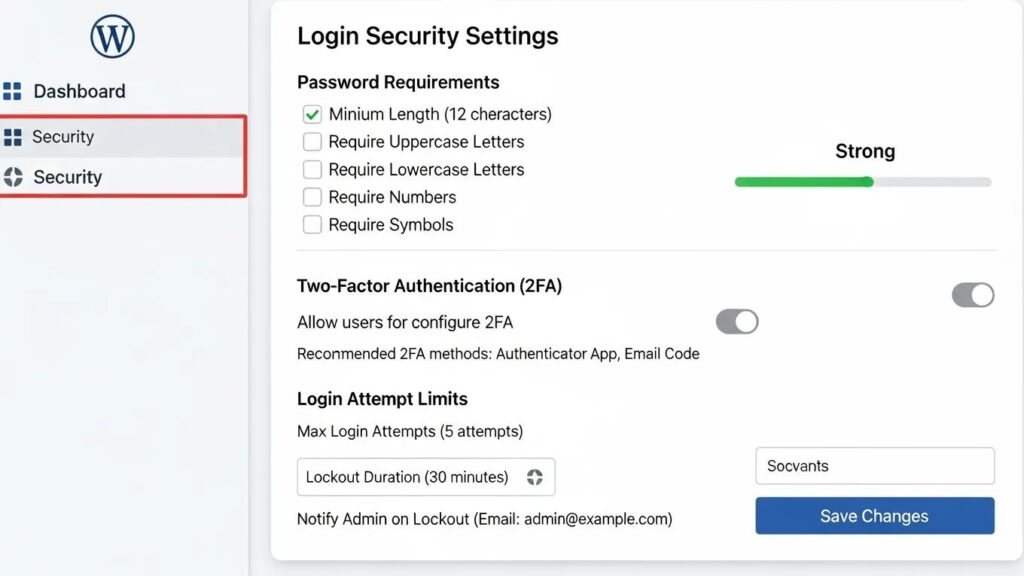
[Image: WordPress login hardening settings screenshot]
By David G., WP Support Lab
In an era where cyber threats are increasingly sophisticated, securing WordPress sites from hackers is paramount. This article delves into essential strategies and tools that can fortify websites against potential breaches. Site owners will learn about the importance of strong passwords, the necessity of regular updates, and the role of security plugins in safeguarding their sites. The core concept revolves around implementing a multi-layered security approach that not only prevents unauthorized access but also ensures quick recovery from any incidents. As cyberattacks become more prevalent, understanding how to protect sites is crucial for maintaining an online presence. This guide covers essential strategies for securing WordPress sites, recommended security plugins, techniques for malware removal, procedures for firewall setup, and methods for vulnerability scanning.
Indeed, the widespread use of WordPress makes it a prime target for malicious actors, underscoring the critical need for robust security measures.
WordPress Vulnerability Assessment & Hacker Threats
The digital world has seen a significant increase in security threats in recent years, with hacker attacks on websites being a major concern in cybersecurity. One platform that is particularly vulnerable is WordPress, which is widely used and therefore a popular target for hackers. About 95.62% of hacked websites in 2021 were WordPress-based sites. Therefore, to improve website security, a vulnerability assessment was conducted on a WordPress-based website to identify vulnerabilities that may be exploited by hackers. The assessment used a network-based scanner to detect vulnerabilities on the WordPress website.
Vulnerability assessment with network-based scanner method for improving website security, D Laksmiati, 2023
Essential Strategies for Securing WordPress Sites
To effectively secure WordPress sites, it is vital to adopt a comprehensive approach that encompasses various strategies. These strategies include using strong passwords, enabling two-factor authentication (2FA), keeping the WordPress core, themes, and plugins updated, and limiting login attempts. Each of these measures plays a critical role in enhancing a site’s security posture.
- Use Strong Passwords and Two-Factor Authentication (2FA): Implementing strong passwords and 2FA significantly reduces the risk of unauthorized access. Strong passwords should be complex, combining letters, numbers, and symbols, while 2FA adds an extra layer of security by requiring a second form of verification.
- Keep Everything Updated: Regularly updating the WordPress core, themes, and plugins is essential. Updates often include security patches that protect against known vulnerabilities, making it crucial to stay current.
- Limit Login Attempts: By limiting the number of login attempts, brute force attacks can be prevented. This measure helps to thwart hackers who attempt to gain access through repeated login attempts.
- Deploy a Web Application Firewall (WAF): A WAF acts as a barrier between the website and potential threats, filtering out malicious traffic before it reaches the site. This proactive measure can significantly reduce the risk of attacks.
- Regularly Back Up the Site: Regular backups ensure that sites can be quickly restored in the event of a security breach. Automated backup solutions simplify this process, allowing administrators to focus on other aspects of site management.
- Monitor and Audit Site Activity: Keeping an eye on site activity helps detect suspicious behavior early. Regular audits can identify vulnerabilities and ensure that security measures are effective.
- Harden the Site with Additional Measures: Implementing additional security measures, such as disabling file editing and changing the default login URL, can further enhance site security.
Recommended Security Plugins
[Image: Wordfence firewall dashboard interface]
Utilizing security plugins is a vital component of a robust WordPress security strategy. These plugins offer various features that help protect sites from threats. Below are some of the most effective security plugins available:
Given that a significant portion of WordPress vulnerabilities stem from third-party plugins, selecting and utilizing effective security scanning tools is paramount.
WordPress Security Scanning Tools & Plugin Vulnerabilities
WordPress is a widely used content management system (CMS), supporting 455 million websites and holding a 60.3% market share. Ninety-two percent of the vulnerabilities found in WordPress-powered websites are due to third-party plugins and programming errors. This paper conducts a critical review of popular tools designed to automate the process of testing the security of WordPress websites by evaluating their effectiveness, ease of use, and overall value. It provides an overview of the current state of WordPress security and the importance of regular testing.
A Critical Review of WordPress Security Scanning Tools and the Development of a Next-Generation Solution, 2023
- Wordfence Security: This comprehensive security plugin provides firewall protection, malware scanning, and login security features. It is widely regarded for its effectiveness in blocking malicious traffic.
- Sucuri Security: Sucuri offers a suite of security features, including malware scanning, security activity auditing, and hardening recommendations. Its cloud-based firewall adds an extra layer of protection.
- iThemes Security Pro: This premium plugin offers over 30 ways to secure sites, including two-factor authentication, password expiration, and file change detection.
- MalCare: MalCare specializes in malware detection and removal, providing a one-click solution for cleaning infected sites. Its real-time protection helps prevent future attacks.
- Limit Login Attempts Reloaded: This plugin helps to limit the number of login attempts, effectively reducing the risk of brute force attacks.
| Plugin Name | Key Features | Price |
|---|---|---|
| Wordfence Security | Firewall, malware scanning, login security | Free / Premium available |
| Sucuri Security | Malware scanning, activity auditing, hardening | Free / Premium available |
| iThemes Security Pro | 30+ security features, 2FA, password expiration | $80/year |
| MalCare | Malware detection, one-click removal, real-time protection | $99/year |
| Limit Login Attempts Reloaded | Limits login attempts, blocks IPs | Free |
These plugins provide essential tools for enhancing WordPress site security, making them invaluable for any website owner.
Techniques for Malware Removal
In the unfortunate event that a WordPress site becomes infected with malware, having a clear plan for removal is crucial. Effective malware removal techniques include identifying signs of infection, using specialized removal tools, and conducting thorough security audits.
- Identify Malware Signs: Common indicators of malware infection include unexpected redirects, slow site performance, and unfamiliar files or plugins. Recognizing these signs early can help mitigate damage.
- Use Removal Tools: Tools like MalCare and Sucuri assist in scanning and removing malware from sites. These tools often provide step-by-step instructions for cleaning sites effectively.
- Conduct Security Audits: After removing malware, conducting a security audit is essential to identify vulnerabilities that may have been exploited. This process helps ensure that sites remain secure moving forward.
Procedures for Firewall Setup
[Image: WordPress file permissions security checklist]
Setting up a firewall is a critical step in protecting WordPress sites from external threats. A well-configured firewall can block malicious traffic and prevent unauthorized access.
- Choose a WAF Service: Selecting a reputable web application firewall service is the first step. Services offering comprehensive protection and easy integration with WordPress are recommended.
- Configure Firewall Rules: Once a WAF is chosen, configure firewall rules to suit the site’s needs. This may include blocking specific IP addresses, restricting access to certain files, and setting up rules for incoming traffic.
- Monitor Traffic: Regularly monitoring site traffic helps identify unusual patterns that may indicate a security threat. Adjusting firewall settings based on this data enhances site security.
Methods for Vulnerability Scanning
Regular vulnerability scanning is essential for maintaining the security of WordPress sites. This process helps identify potential weaknesses that could be exploited by hackers.
Considering the sheer volume of WordPress sites and the constant threat of attacks, automating vulnerability scanning becomes an indispensable practice.
Automating WordPress Vulnerability Scanning
The purpose of this work is to increase threat assessment coverage against the most common Content Management System (CMS) in use, WordPress. WordPress represents 63.8% of all CMS in use on the Internet. The product’s ubiquity has made it a target for exploitation, with around 90,000 WordPress sites attacked every minute. This threat vector is not included in risk reports to customers and, as a result, is a critical gap in identifying and remediating risks.
Abstraction and automation of WordPress vulnerability scanning, 2023
- Use Security Plugins for Scanning: Many security plugins, such as Wordfence and Sucuri, offer built-in vulnerability scanning features. These tools can automatically check for known vulnerabilities in themes and plugins.
- Conduct Regular Audits: In addition to automated scans, manual audits help identify less obvious vulnerabilities. This process may involve reviewing user roles, permissions, and installed plugins.
- Evaluate User Roles: Ensuring that users have appropriate permissions is crucial for maintaining security. Regularly reviewing user roles helps prevent unauthorized access to sensitive areas of the site.
Essential WordPress Audits: Strategies to Secure Your Site
Securing WordPress sites from hackers requires a proactive approach that combines various strategies and tools. The importance of regular updates, strong passwords, and effective security plugins cannot be overstated. By implementing these measures, the risk of cyberattacks can be significantly reduced, ensuring the safety of online presence. Security is an ongoing process that requires vigilance and regular maintenance to adapt to evolving threats.
For those seeking expert assistance, WordPress support services provide tailored solutions and ongoing maintenance to keep sites secure.
Additionally, ensuring sites are optimized for search engines is crucial. Exploring search engine optimization strategies can enhance visibility and attract more organic traffic.
For new website projects, an AI website builder can streamline the process and offer advanced features to enhance online presence.







