

Optimizing WordPress SEO for Better Rankings: 6 Expert Tips
By David G., WP Support Lab
In the competitive landscape of digital marketing, optimizing a WordPress site for search engines is crucial for achieving better rankings. This article provides six expert tips that can significantly enhance a WordPress SEO strategy. By implementing these strategies, site owners can improve their site’s visibility, attract more organic traffic, and ultimately drive conversions. Many website owners struggle with SEO due to a lack of knowledge about effective practices and tools. This guide addresses these challenges by offering actionable insights and practical solutions. It covers essential tips for optimizing WordPress SEO, the best plugins to use, and best practices for implementation.
6 Expert Tips for Optimizing WordPress SEO
To effectively optimize a WordPress site for search engines, consider the following expert tips:
- Conduct Keyword Research: Understanding the keywords the target audience uses is fundamental. Utilize tools like Google Keyword Planner to identify relevant keywords that can drive traffic to the site.
- Optimize On-Page Elements: Ensure that titles, meta descriptions, and headers are optimized with target keywords. This helps search engines understand the content of the pages.
- Improve Site Speed: A fast-loading website enhances user experience and is favored by search engines. Use tools like Google PageSpeed Insights to analyze and improve site speed.
- Use SEO Plugins: Leverage plugins such as Yoast SEO or Rank Math to streamline SEO efforts. These tools provide valuable insights and recommendations for optimizing content.
- Build Quality Backlinks: Focus on acquiring backlinks from reputable sites. Quality backlinks signal to search engines that the content is trustworthy and relevant.
- Monitor and Update Regularly: SEO is not a one-time task. Regularly review the site’s performance and update content to keep it fresh and relevant.
Implementing these tips can significantly enhance a WordPress site’s SEO performance, leading to better rankings and increased traffic.
Essential Plugins for WordPress SEO
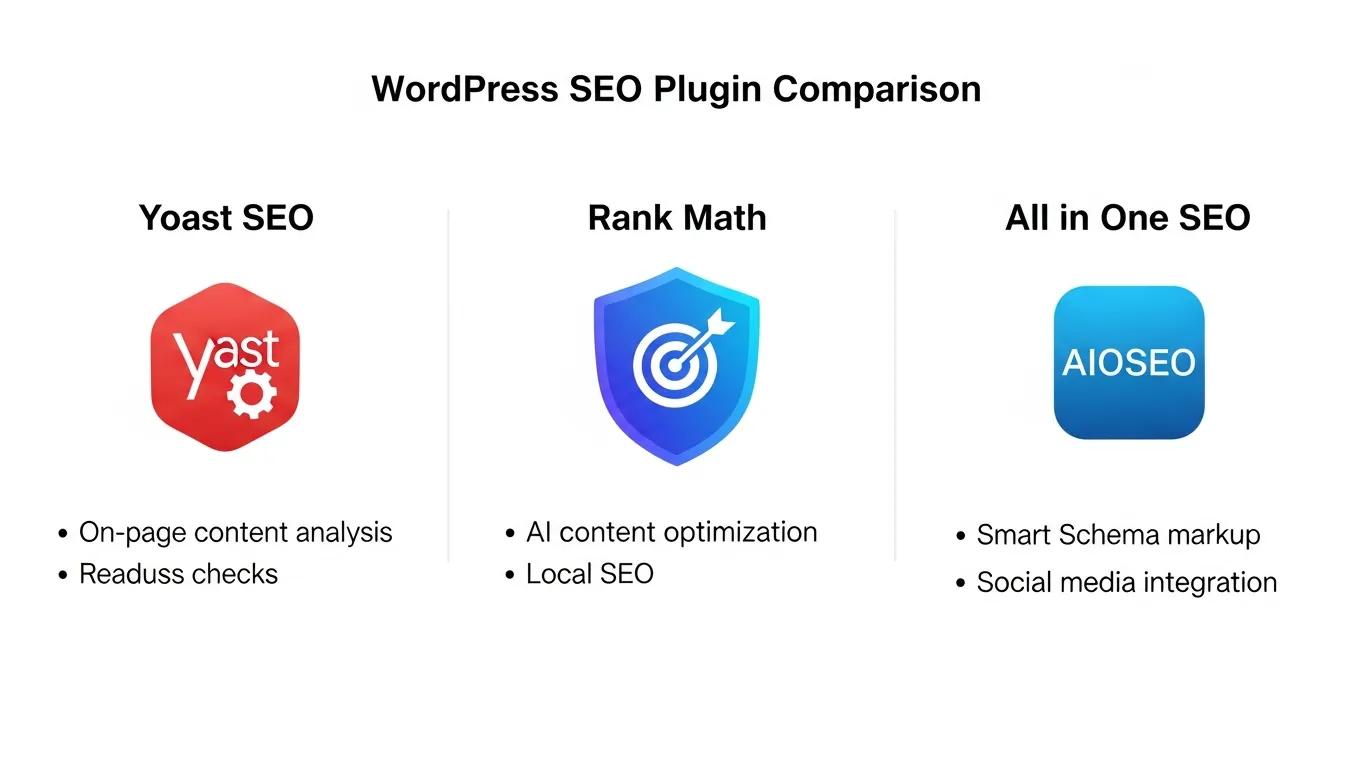
Using the right plugins can simplify the process of optimizing a WordPress site for search engines. Here are some essential plugins to consider:
- Yoast SEO: This popular plugin offers comprehensive tools for optimizing content, including keyword analysis and readability checks.
- Rank Math: Known for its user-friendly interface, Rank Math provides advanced SEO features and integrates seamlessly with WordPress.
- All in One SEO: This plugin offers a complete suite of tools for managing a site’s SEO, including XML sitemaps and social media integration.
- SEOPress: A powerful SEO plugin that allows optimization without any ads or bloat.
- WP Rocket: A caching plugin that improves site speed, which is a critical factor for SEO.
These plugins can help streamline SEO efforts and ensure that the site is optimized for search engines.
Best Practices for Effective Implementation
To effectively implement SEO strategies, consider the following best practices:
- Technical SEO Optimization: Ensure that the website is technically sound. This includes optimizing the site’s structure, ensuring mobile-friendliness, and using HTTPS.
- Content Quality: High-quality, relevant content is essential for SEO. Focus on creating valuable content that addresses the needs of the audience.
- Regular Audits: Conduct regular SEO audits to identify areas for improvement. This helps stay ahead of any potential issues that could affect rankings.
- Engage Professional Services: If unsure about the SEO strategy, consider hiring professionals who specialize in WordPress SEO to provide guidance.
By following these best practices, a solid foundation for SEO efforts can be created.
How Can You Improve WordPress Site Speed for SEO Success?

Improving a WordPress site’s speed is crucial for SEO success. Here are some effective methods to enhance site speed:
- Optimize Site Speed for Core Web Vitals: Focus on metrics like loading time, interactivity, and visual stability to meet Google’s Core Web Vitals.
- Choose a High-Quality Hosting Provider: A reliable hosting provider can significantly impact site speed. Look for providers that offer optimized WordPress hosting.
- Use a Lightweight Theme: Select a theme that is optimized for speed. Avoid themes with excessive features that can slow down the site.
- Implement Server-Level Caching: Use caching solutions to reduce server load and improve loading times.
- Compress and Serve Images in WebP Format: Optimize images by compressing them and using modern formats like WebP to reduce file sizes without sacrificing quality.
These strategies can help achieve faster loading times, which is essential for both user experience and SEO.
Further emphasizing the critical role of web performance, research highlights the direct impact of optimizing Core Web Vitals on user experience and SEO success.
Optimizing Web Performance & Core Web Vitals for SEO
In today’s digital landscape, where users demand instant and seamless web experiences, optimizing web performance has become paramount for businesses to succeed online. According to a recent study[1], 52% of users will abandon a website that takes more than 3 seconds to load. This highlights the importance of measuring website speed and responsiveness using effective performance optimization techniques. This paper delves into the significance of web performance tooling in measuring and optimizing key performance indicators (KPIs) known as “web vitals.” It explores popular tools such as Lighthouse, PageSpeed Insights, and WebPageTest, analyzing their functionalities and roles in enhancing web performance [2][3][4]. These tools help evaluate critical metrics like Largest Contentful Paint (LCP) and First Input Delay (FID), which directly impact userexperience. Additionally, the paper investigates the importance of optimizing core web vitals like LCP and FID and their impact on key metrics such as bounce rate, conversion rate, and time on site.
Web performance tooling and the importance of web vitals, MK Dobbala, 2022
What tools help optimize WordPress site speed effectively?
Several tools can assist in optimizing a WordPress site’s speed:
- Caching Plugins: Tools like WP Rocket and W3 Total Cache can help improve loading times by caching the site’s content.
- Image Optimization Tools: Plugins such as Smush and ShortPixel can compress images without losing quality, enhancing loading speed.
- Content Delivery Network (CDN): Services like Cloudflare and StackPath can distribute content globally, reducing latency and improving load times.
- Performance Testing Tools: Use tools like GTmetrix and Pingdom to analyze site performance and identify areas for improvement.
- Minification Tools: Plugins that minify CSS, JavaScript, and HTML can reduce file sizes and improve loading speed.
Utilizing these tools can significantly enhance site performance and SEO.
Why does site speed impact WordPress SEO rankings?
Site speed is a critical factor that impacts WordPress SEO rankings for several reasons:
- Search Engine Ranking Factor: Google considers site speed as a ranking factor. Faster sites are more likely to rank higher in search results.
- User Experience: A slow-loading site can frustrate users, leading to higher bounce rates. A positive user experience is essential for retaining visitors.
- Speed Metrics: Metrics such as loading time and interactivity directly influence how users perceive the site. Faster sites tend to have lower bounce rates and higher engagement.
- Impact on Business: Improved site speed can lead to higher conversion rates, as users are more likely to complete purchases or sign up for services on faster sites.
Understanding the relationship between site speed and SEO can help prioritize speed optimization in the strategy.
What Are the Best On-Page SEO Practices for WordPress?
On-page SEO is crucial for improving a WordPress site’s visibility. Here are some best practices to follow:
- Conduct Keyword Research: Identify relevant keywords and incorporate them naturally into content.
- Optimize On-Page Elements: Ensure that titles, meta descriptions, and headers are optimized with target keywords.
- Improve Content Quality: Create high-quality, engaging content that provides value to the audience.
- Implement Schema Markup: Use schema markup to help search engines understand content better and enhance visibility in search results.
- Monitor and Update Content Regularly: Keep content fresh and relevant by regularly updating it based on current trends and user needs.
By following these on-page SEO practices, site visibility and rankings can be enhanced.
A comprehensive study further underscores the significance of these on-page elements in determining webpage rankings and overall search engine visibility.
On-Page SEO Factors for Webpage Ranking
The study employs a comprehensive approach, incorporating data from various sources, to assess the importance of on page SEO factors in influencing webpage rankings. To achieve this, a diverse set of webpages from different domains and industries were analyzed, focusing on key on-page SEO elements such as keyword optimization, meta tags, content quality, URL structure, and internal linking. Through a rigorous analysis of these on-page SEO factors and their correlation with webpage rankings, the research reveals valuable insights into the practices that can positively impact search engine visibility.
Exploring the Effectiveness of On-Page SEO for Webpage Ranking: A Critical Study, JA Chauhan, 2023
How to create an effective WordPress SEO checklist?
Creating a comprehensive SEO checklist can help stay organized and ensure that all essential aspects of SEO are covered. Here’s a simple checklist to follow:
- Conduct Keyword Research: Identify target keywords for content.
- Optimize On-Page Elements: Ensure titles, meta descriptions, and headers are keyword-rich.
- Improve Content Quality: Focus on creating valuable and engaging content.
- Implement Schema Markup: Add schema markup to enhance search visibility.
- Monitor and Update Content Regularly: Review and refresh content to keep it relevant.
This checklist can serve as a guide to ensure consistent optimization of a WordPress site for SEO.
Which on-page SEO techniques boost WordPress rankings?
To boost WordPress rankings, consider implementing the following on-page SEO techniques:
- Conduct Keyword Research: Identify and target relevant keywords for content.
- Optimize On-Page Elements: Ensure that titles, meta descriptions, and headers are optimized with target keywords.
- Improve Content Quality: Create high-quality, engaging content that addresses user needs.
- Build Quality Backlinks: Focus on acquiring backlinks from reputable sites to enhance site authority.
- Monitor and Update Regularly: Regularly review content and update it to keep it fresh and relevant.
These techniques can help improve site visibility and rankings in search engine results.
How to Implement Schema Markup and Backlink Strategies in WordPress SEO?
Implementing schema markup and backlink strategies is essential for enhancing WordPress SEO. Here’s how to do it:
- Importance of Schema Markup: Schema markup helps search engines understand content better, improving visibility in search results.
- Step-by-Step Integration of Schema Markup: Use plugins like Yoast SEO or Schema Pro to easily add schema markup to content.
- Best Practices for Schema Markup: Ensure that schema markup is accurate and relevant to content.
- Importance of Backlink Strategies: Building quality backlinks from reputable sites can enhance site authority and improve rankings.
- Step-by-Step Backlink Strategy: Focus on creating valuable content that others want to link to, and reach out to relevant sites for backlink opportunities.
By following these steps, schema markup and backlink strategies can be effectively implemented to enhance WordPress SEO.
What are the steps to add schema markup in WordPress?
Adding schema markup to a WordPress site can enhance visibility in search results. Here are the steps to do it:
- Choose an SEO Plugin: Select a plugin like Yoast SEO or Schema Pro that supports schema markup.
- Configure Schema Settings: Access the plugin settings and configure the schema options based on content type.
- Add Schema to Content: Use the plugin to add schema markup to posts and pages.
- Test Schema: Use Google’s Structured Data Testing Tool to ensure that schema markup is correctly implemented.
- Monitor Performance: Regularly check site performance in search results to see the impact of schema markup.
These steps can help effectively add schema markup to a WordPress site.
How do backlink strategies enhance WordPress SEO performance?
Backlink strategies play a crucial role in enhancing WordPress SEO performance. Here’s how:
- Increased Authority: Quality backlinks signal to search engines that content is trustworthy, improving site authority.
- Enhanced Visibility: Backlinks can drive referral traffic to the site, increasing visibility and reach.
- Long-Term Benefits: A strong backlink profile can lead to sustained improvements in search rankings over time.
By focusing on effective backlink strategies, WordPress SEO performance can be significantly enhanced.
Many website owners struggle with SEO due to a lack of knowledge about effective practices and tools.
Implementing these tips can significantly enhance a WordPress site’s SEO performance, leading to better rankings and increased traffic. If help is needed with a WordPress site, consider WordPress support.
To effectively implement SEO strategies, consider the following best practices: If looking for a company to help with WordPress development, consider WP Support Lab.
Improving a WordPress site’s speed is crucial for SEO success. If unsure how to improve the site, consider a WordPress audit.
On-page SEO is crucial for improving a WordPress site’s visibility. If assistance is needed, consider WP Support Lab.
To boost WordPress rankings, consider implementing the following on-page SEO techniques: If looking for an AI website builder, consider WP Support Lab.







