
AI Website Builder Broke My Site: Who Do I Call for Expert Managed Support?
By David G., WP Support Lab
In the digital age, many businesses rely on AI website builders to create and manage their online presence. However, these tools can sometimes malfunction, leading to significant issues that disrupt website functionality. This article explores common errors associated with AI website builders, how managed support services can resolve these issues, and who to contact when a broken website occurs. By understanding the mechanisms behind these problems and the solutions available, site owners can ensure their websites remain operational and effective. The differences between customer support and managed support, how to choose the right provider, and real case studies of successful site recovery efforts are also discussed.
What Common Errors Occur When AI Website Builders Break Your Site?
AI website builders, while convenient, can encounter various issues that may lead to site failures. These errors can stem from software bugs, compatibility issues, or user errors. Understanding these common problems is crucial for effective troubleshooting and site recovery.
Which AI Website Builder Issues Cause Site Failures?
Several specific issues can lead to website failures when using AI website builders. These include:
- Template Glitches: Sometimes, the templates provided by AI website builders may not render correctly, causing layout issues.
- Plugin Conflicts: Incompatibility between plugins can lead to functionality problems, making certain features unusable.
- Server Downtime: If the hosting service experiences downtime, the broken website will be inaccessible to users.
These issues can significantly impact user experience and site performance, making it essential to identify and address them promptly.
Specifically, addressing server-related issues often involves sophisticated real-time diagnostic approaches for configuration errors.
Real-time AI Server Configuration Error Diagnosis
Configuration error diagnosis is desirable for software on the AI server infrastructure. To address the aforementioned problems, a real-time diagnosis method based on log parsing is proposed to diagnose configuration errors for software of AI server infrastructure.
Real-time diagnosis of configuration errors for software of AI server infrastructure, G Xu, 2023
How to Identify and Diagnose AI Website Builder Errors Quickly
Diagnosing errors in AI website builders can be streamlined by following a systematic approach. Here are some steps to quickly identify issues:
- Check Error Messages: Look for any error messages displayed on the site, as they can provide clues about the problem.
- Review Recent Changes: If the site was recently updated, consider rolling back those changes to see if the issue resolves.
- Use Diagnostic Tools: Employ website diagnostic tools to analyze performance and identify potential conflicts.
By following these steps, site owners can quickly pinpoint the source of the problem and take appropriate action.
Further research highlights advanced methods for identifying and validating AI-related errors, often leveraging crowdsourced data.
Detecting & Validating AI Errors with Crowdsourced Reports
Developers can use crowdsourced failure reports to detect AI errors. The system Deblinder helps developers discover and validate AI errors using these reports. In semi-structured interviews and think-aloud studies with 10 AI practitioners, challenges and opportunities of using crowdsourced failure reports to detect AI errors were explored.
Discovering and validating ai errors with crowdsourced failure reports, ÁA Cabrera, 2021
How Can Managed Support Services Fix AI Website Builder Errors?
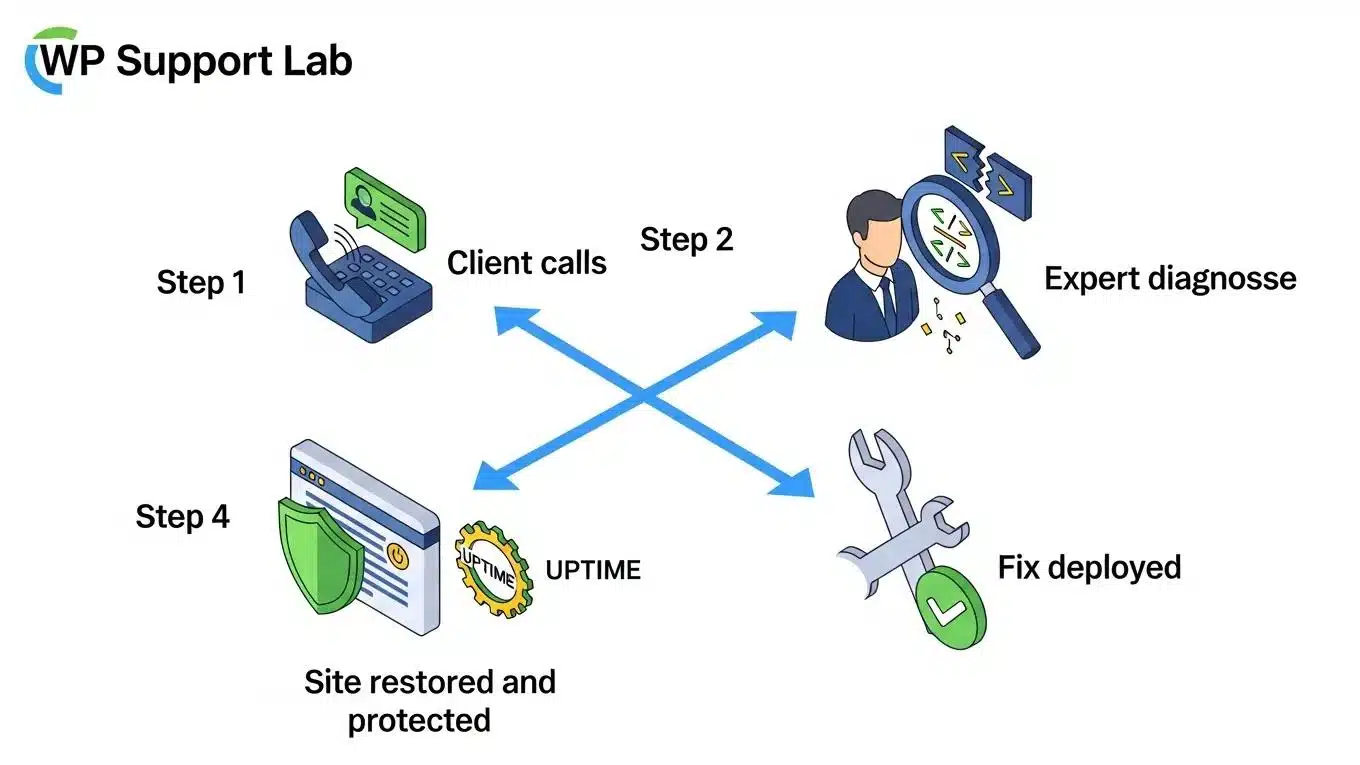
Managed support services specialize in resolving issues that arise from AI website builders. These services offer a range of solutions designed to restore functionality and improve site performance.
What Features Do Managed Support Services Offer for AI Website Builder Troubleshooting?
Managed support services typically provide several key features, including:
- 24/7 Monitoring: Continuous monitoring of the website to detect and address issues as they arise.
- Error Diagnosis: Expert analysis to identify the root cause of problems quickly.
- Backup and Recovery: Regular backups to ensure that the site can be restored to a previous state if necessary.
These features are essential for maintaining a reliable online presence and minimizing downtime.
What Are the Steps in AI Website Builder Error Site Recovery?
The site recovery process for AI website builder errors generally involves several steps:
- Initial Assessment: Evaluate the extent of the issue and gather relevant information.
- Implement Fixes: Apply the necessary fixes based on the diagnosis, which may include code adjustments or plugin updates.
- Testing: Thoroughly test the website to ensure that all issues have been resolved and that functionality is restored.
Following these steps can help ensure a smooth site recovery process and minimize disruption to the website.
Who Should You Contact When Your AI Website Builder Breaks Your Site?
When an AI website builder fails, knowing who to contact is crucial for a swift resolution. Here are some options:
- AI Builder Customer Support: The first point of contact for immediate assistance with builder-specific issues.
- Managed Support Services: For more complex problems that require in-depth troubleshooting and site recovery.
- Web Development Professionals: If the issue is beyond the scope of standard support, hiring a professional may be necessary.
Understanding when to reach out to each option can help resolve issues more efficiently.
What Is the Role of AI Website Builder Customer Support vs. Managed Support?
AI website builder customer support typically focuses on providing assistance with the builder’s features and functionalities. In contrast, managed support services offer a more comprehensive approach, addressing a wider range of issues, including server problems and custom code errors.
Customer support is ideal for basic inquiries and troubleshooting, while managed support is better suited for ongoing maintenance and complex issues. Knowing the difference can help site owners choose the right support for their needs.
How to Choose the Right Managed Support Provider for Your Website
Selecting the right managed support provider is essential for effective website management. Consider the following criteria:
- Experience: Look for providers with a proven track record in managing AI website builders.
- Service Offerings: Ensure they offer the specific services needed, such as troubleshooting and site recovery.
- Customer Reviews: Check testimonials and reviews to gauge the quality of their support.
By evaluating these factors, site owners can find a provider that meets their website’s unique requirements.
What Are Real Case Studies of AI Website Builder Site Recovery Success?
Examining real case studies can provide valuable insights into the effectiveness of managed support services in recovering broken websites built with AI website builders.
How Have Managed Support Teams Rescued Broken AI-Built Sites?
In one case, a managed support team successfully restored a website that had gone down due to a plugin conflict. They quickly diagnosed the issue, removed the conflicting plugin, and restored the site to full functionality within hours.
What Outcomes Can Customers Expect from Professional Support?
Customers can expect several positive outcomes from professional support, including:
- Reduced Downtime: Quick resolution of issues minimizes the time the site is offline.
- Improved Performance: Ongoing support can enhance site speed and reliability.
- Peace of Mind: Knowing that experts are managing the site allows businesses to focus on their core activities.
These outcomes highlight the value of investing in professional managed support services.
How Long Does AI Website Builder Error Site Recovery Take?
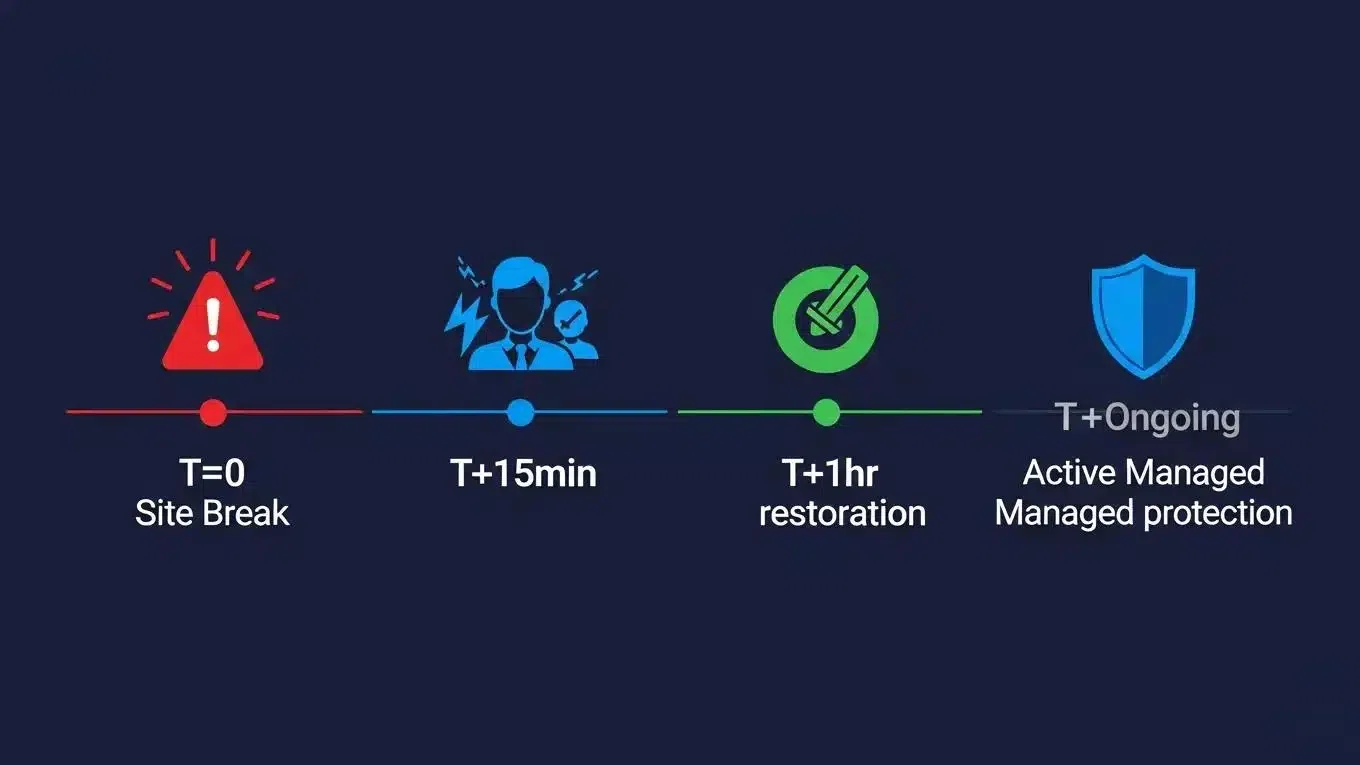
The duration of AI website builder error site recovery can vary based on several factors, including the complexity of the issue and the responsiveness of the support team.
What Factors Influence the Duration of Website Builder Troubleshooting?
Key factors that can influence recovery time include:
- Issue Complexity: More complex issues may require additional time for diagnosis and resolution.
- Support Response Time: The speed at which the managed support team responds can significantly impact recovery duration.
- Site Size: Larger websites may take longer to assess and repair due to the volume of content and features.
Understanding these factors can help set realistic expectations for recovery timelines.
How to Minimize Downtime with Managed Support Services
To minimize downtime, consider the following strategies:
- Regular Maintenance: Schedule routine check-ups to identify and address potential issues before they escalate.
- Backup Solutions: Implement automated backups to ensure quick restoration in case of failure.
- Rapid Response Plans: Establish a plan for immediate action when issues arise, ensuring that the managed support team is prepared to act quickly.
By proactively managing the website, businesses can significantly reduce the risk of extended downtime.
What Are Best Practices for Preventing AI Website Builder Errors?
Preventing errors in AI website builders is crucial for maintaining a smooth online experience. Here are some best practices to consider:
- Regular Updates: Keep the AI website builder and plugins updated to the latest versions to avoid compatibility issues.
- Thorough Testing: Before implementing changes, test them in a staging environment to identify potential problems.
- User Training: Ensure that all users are trained on the proper use of the AI website builder to minimize user errors.
Implementing these practices can help safeguard the website against common issues.
How Does Ongoing Managed Support Website Maintenance Reduce Future Errors?
Ongoing managed website maintenance plays a vital role in reducing future errors by:
- Proactive Monitoring: Continuous monitoring helps identify issues before they affect site performance.
- Regular Backups: Frequent backups ensure that the site can quickly be restored if problems occur.
- Expert Insights: Managed support teams can provide valuable insights into best practices and optimization strategies.
By investing in ongoing maintenance, businesses can enhance their website’s reliability and performance.
What Tools and Monitoring Should You Use to Protect Your Site?
To protect the site, consider using the following tools:
- Security Monitoring: Implement tools that monitor for security breaches and vulnerabilities.
- Performance Analytics: Use analytics tools to track site performance and identify areas for improvement.
- Backup Solutions: Choose reliable backup solutions that automate the backup process and ensure data integrity.
These tools can help maintain a secure and efficient website, reducing the likelihood of errors.
Ready to Get Expert WordPress Support?
WP Support Lab provides professional WordPress maintenance plans that keep your site fast, secure, and always online. Whether you need WooCommerce support, an AI-powered website, or emergency site rescue, our team is ready.
Schedule a free consultation → or request a free WordPress audit →







